How to Use Unsloth Studio for Fast and Affordable AI Fine-Tuning
As AI demand grows, models are expected to perform increasingly complex tasks with pinpoint accuracy, often leaving founders and engineers scratching their heads. Hard-pressed to find ways to improve their systems, fine-tuning provides a novel solution. With tweaks and training, a model can be taught to produce high accuracy, consistent responses for all manner of specialized tasks. This is where tools such as Unsloth come in.
Why use Unsloth Studio?
Unsloth, an open-source, code-driven framework for training and running AI models, released its no-code/low-code web UI, Unsloth Studio, in early 2026. It's a convenient solution that makes fine-tuning a breeze, simplifying training, inference, data, and deployment.
Unsloth Studio currently supports over 500 models, training them 2x faster than traditional fine-tuning methods while requiring 70% less VRAM, all with no accuracy loss. It also runs, trains, and exports GGUF and safetensors models locally on Mac, Windows, and Linux. More efficient VRAM usage, faster training speeds, and local model support mean reduced computational needs and, as a result, cloud costs.
Getting started with Unsloth Studio
The general process required to run and train your models in Unsloth Studio is straightforward:
- Install Unsloth Studio
- Choose a base model
- Create or upload a dataset
- Configure fine-tuning settings
- Start training
- Test your fine-tuned model
- Export the model
For your convenience, we've built a comprehensive guide that includes all of the information you'll need to get Unsloth Studio set up on your Vast.ai GPU instance. Be sure to use our pre-configured Unsloth Studio template in conjunction with the guide to make setup even easier.
Fine-tuning at a glance
The basics
Fine-tuning uses datasets to improve pre-trained models in key ways:
- Update and learn: Incorporate and learn domain-specific knowledge.
- Customize behavior: Engineers can adjust AI model tone, personality, or response style.
- Tailor models for specific tasks: Enhance accuracy and relevance for specialized workflows.
When compared to Retrieval-Augmented Generation (RAG), fine-tuning replicates all of RAG's capabilities, but not vice versa. There is a common misconception that fine-tuning doesn't perform as well as RAG and that it can't make a model learn new knowledge. This is untrue. A specialized model can train with fine-tuning and reinforcement learning (RL) while RAG only changes what the model sees at inference time.
How does fine-tuning achieve memory savings?
Unsloth Studio adds two thin matrices to model weights and optimizes those, rather than changing all weights. This means that only a small fraction of weights, often well under 5%, depending on the LoRA rank and which layers are targeted, have to be optimized and quantization from 16-bit (LoRA) to 4-bit (QLoRA) saves 75% memory.
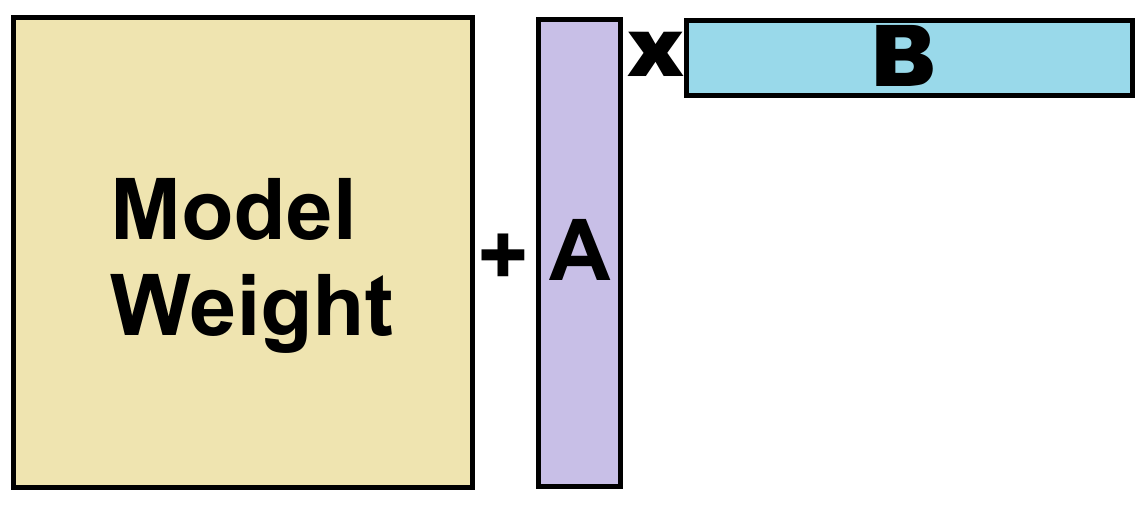
Image source: Unsloth fine-tuning guide
Choosing your model and method
When starting, it is recommended to use instruct models which require less data than base models. They also allow for direct fine-tuning using convenient conversational chat templates (ChatML, ShareGPT, etc.).
Regarding model training, you will need to choose between multiple methods:
- Reinforcement learning (RL): This method is most advantageous for training models to excel at specific behaviors using an environment and reward function instead of labeled data.
- LoRA: A parameter efficient training technique that trains a small set of low-rank adapter weights with 16-bit precision.
- QLoRA: This method augments LoRA with 4-bit precision to more efficiently handle large models.
- Fine-tuning: The Unsloth framework supports full fine-tuning (FFT) and pretraining, though both demand substantially more resources. If configured correctly, LoRA can match the gains of FFT.
Unsloth recommends QLoRA to start, as it is both accessible and highly effective at training models.
Creating your datasets
Formatted and organized datasets are crucial for model fine-tuning success. Datasets should generally contain two columns, question and answer, and the data must be able to be tokenized.
Data can be generated synthetically and structured using an LLM. Unsloth Studio also provides a free Synthetic Dataset notebook that can parse documents, including PDFs and videos, generate QA pairs, and auto-clean data.
Generally, you should build a well-structured dataset rather than dumping data alone. This ensures learning, understanding, and response accuracy. Keep in mind, though, that if you're fine-tuning for code, dumping all of your code data can indeed bring significant performance improvements. Be sure to carefully consider your use case when building your fine-tuning strategy.
AI training hyperparameters
Hyperparameters are essentially the settings when tuning AI models. They control how Low-Rank Adaptation fine-tunes LLMs and can be quite involved. Therefore, Unsloth provides a comprehensive guide to hyperparameters for your convenience.
The key hyperparameter choices one needs to consider are as follows:
- Learning rate: Controls how aggressively the model adjusts its weights during training.
- Epochs: Specifies how many complete passes the model makes through the training dataset.
- LoRA or QLoRA: LoRA fine-tunes models using 16-bit precision, while QLoRA uses 4-bit quantization to reduce VRAM usage and hardware requirements.
Ready to start improving your models?
We hope that this fine-tuning breakdown has given you the confidence to train and customize your AI models with Unsloth Studio. At Vast.ai, our mission goes beyond providing high-performance cloud GPU infrastructure and support; we also strive to educate so that engineers and founders have the knowledge and resources they need to create, build, and scale effectively.
For additional information on how to fine-tune your LLM with Unsloth Studio, check out Unsloth's fine-tuning guide.