NVIDIA B300 vs. H200: Is Blackwell Ultra Worth the Upgrade?
If you're operating at the frontier of AI and high-performance computing, you already know that GPU selection can make or break your infrastructure strategy.
NVIDIA's H200 GPU set a new standard for performance when it arrived as Hopper's high-memory successor. But the Blackwell Ultra-based B300 raises an obvious question: is it finally time to upgrade?
Both GPUs are built for serious compute demands. On paper, the B300 is the more capable machine, but that does not automatically make it the better choice. Here is how the B300 and H200 compare side by side, and when Blackwell Ultra is worth the jump.
NVIDIA H200: Hopper's Finest
The H200 GPU builds on the foundation of the H100, retaining the same Hopper architecture while improving one of the biggest bottlenecks in modern AI workloads: memory.
Equipped with 141 GB of HBM3e memory and 4.8 TB/s of memory bandwidth, the H200 increases memory capacity and bandwidth over the H100. These gains matter for memory-intensive workloads such as large language model inference and retrieval-augmented generation.
The H200 is no slouch on throughput, either. In NVIDIA's Llama 2 70B benchmark discussion, H200 systems reached more than 31,000 tokens per second.
Some notable H200 features include:
- 141 GB of HBM3e memory at 4.8 TB/s bandwidth.
- Up to 1.9x the LLM inference performance of H100 in NVIDIA's H200 positioning.
- 900 GB/s of fourth-generation NVLink bandwidth per GPU for intra-node communication.
- A practical upgrade path for teams already built around Hopper systems and software.
Even after the launch of Blackwell, the H200 remains one of the most widely adopted GPUs for enterprise AI because it combines high memory capacity, a mature software ecosystem, and a manageable infrastructure profile.
But if your workload is moving into frontier inference, very long context windows, or exascale-style deployments, the B300 is a different class of accelerator.
NVIDIA B300: The Arrival of Blackwell Ultra
The Blackwell Ultra B300 is one of NVIDIA's highest-end accelerators for the inference era. It was designed for the surge in agentic AI systems, large-scale reasoning workloads, and models that need more memory than earlier generations can comfortably provide.
The B300's memory capacity gets attention first. Blackwell Ultra supports up to 288 GB of HBM3e memory with up to 8 TB/s of bandwidth. That is roughly twice the memory capacity of H200. A 70B model in FP16 can require about 140 GB of VRAM for weights alone, so B300 leaves far more room for KV cache, batching, and longer context windows.
Meanwhile, H200's 141 GB can be enough for many 70B workloads, but headroom gets tight when batch sizes, context length, or serving overhead grow. As workload complexity increases, B300's additional memory can help sustain throughput without forcing as much quantization or sharding.
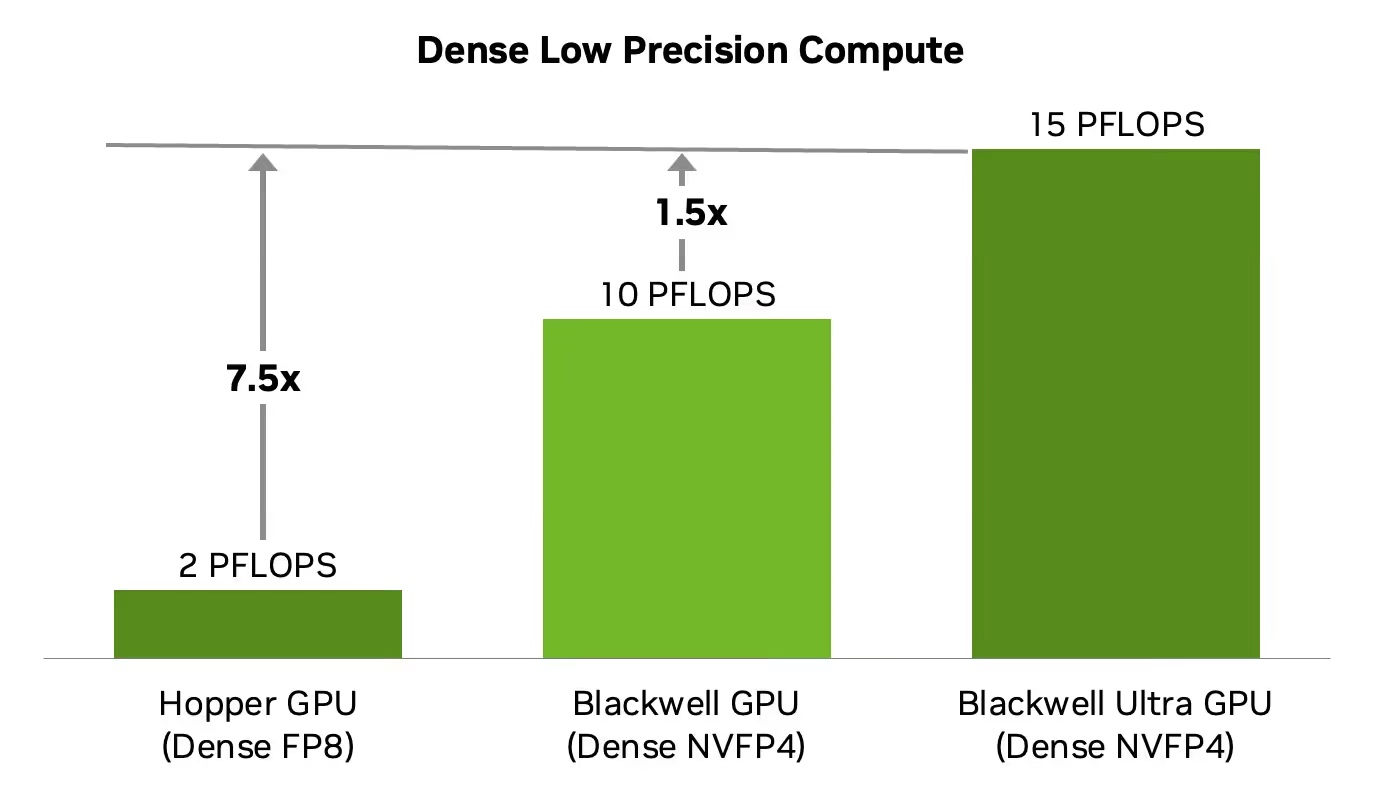
Beyond memory, the B300 features fifth-generation Ultra Tensor Cores with native NVFP4 support. Blackwell Ultra pushes dense low-precision compute to 15 PFLOPS of dense NVFP4 performance, which is a major step up from Hopper's dense FP8 capability.
However, the B300 also comes with a steep infrastructure profile. NVIDIA lists Blackwell Ultra max power at up to 1,400 W TGP, while DGX B300 systems are specified at roughly 14 kW system power. That means power delivery, cooling, rack design, and facility planning matter just as much as raw GPU performance.
Standout B300 features include:
- 288 GB of HBM3e memory and 8 TB/s memory bandwidth.
- Fifth-generation Ultra Tensor Cores with native NVFP4 support.
- Fifth-generation NVLink with 1.8 TB/s bandwidth per GPU.
- ConnectX-8 networking in DGX B300 systems for high-speed cluster connectivity.
- A memory and compute profile built for large-scale inference, reasoning, and multi-GPU deployments.
To really understand the tradeoff, it helps to compare the two GPUs directly.
NVIDIA H200 vs B300: Full Spec Comparison
| Feature | H200 | B300 |
|---|---|---|
| Architecture | Hopper | Blackwell Ultra |
| Memory | 141 GB HBM3e | 288 GB HBM3e |
| Memory Bandwidth | 4.8 TB/s | 8 TB/s |
| CUDA Cores | 16,896 | 20,480+ |
| Tensor Cores | 528 fourth-gen Tensor Cores | 640 fifth-gen Ultra Tensor Cores |
| Transformer Engine | First generation | Second generation |
| Form Factor | SXM | SXM |
| Interconnect | NVLink 4, 900 GB/s per GPU | NVLink 5, 1.8 TB/s per GPU |
| Networking | ConnectX-7 in DGX H200 systems | ConnectX-8 in DGX B300 systems |
| PCIe Generation | Gen 5 | Gen 6 |
| Precision Formats | FP8, FP16/BF16, TF32, FP32, FP64, INT8 | FP4, FP8, FP16/BF16, TF32, FP32, FP64, INT8 |
| Multi-Instance GPU | Up to 7 instances | Up to 7 instances |
| Max Power | Up to 700 W TGP | Up to 1,400 W TGP |
| Cooling Profile | Air or liquid-cooled systems | Purpose-built high-density systems |
The B300 may look like the obvious winner. But real-world requirements are a whole other problem.
H200 vs B300 Use Cases: Which GPU Is Right for Your Workload?
Whether you already have H200s or you're deciding between H200 and B300 instances, the right GPU depends on your workload, your infrastructure assumptions, and how quickly your memory needs are growing.
The H200 is likely the right choice if you:
- Need a proven, high-performance GPU for enterprise-scale AI workloads without moving into the highest-density Blackwell Ultra tier.
- Are working with memory-bound workloads where 141 GB gives you enough headroom, including many 70B inference and long-context RAG deployments.
- Want to upgrade from existing Hopper deployments without rethinking your full power and cooling footprint.
- Have power, budget, or availability constraints but still need strong performance per dollar.
The B300 may be worth the upgrade if you:
- Need to run 70B+ parameter models with more KV cache and batching room on each GPU.
- Need to serve large reasoning models where long context windows would overwhelm H200 memory.
- Need maximum inference throughput and scalability for high-volume or frontier workloads.
- Want to prepare for the next generation of agentic AI and larger multimodal model deployments.
The Bottom Line
The NVIDIA H200 and B300 are both serious datacenter GPUs. The H200 delivers proven Hopper performance with a mature deployment path and a more manageable infrastructure profile. It remains a strong choice for many production AI teams.
The Blackwell Ultra B300 is in a higher tier for memory capacity, low-precision inference, and scaling headroom. But its power draw and system requirements are also higher, so the upgrade only makes sense when your workload can use that extra memory and compute.
For most teams, the decision comes down to more than benchmark numbers. Top-tier GPUs are expensive to buy, install, power, cool, and operate. That is where Vast.ai helps.
Whether you need H200s for enterprise AI inference, B300s for frontier model workloads, or other NVIDIA GPUs for development and scaling, Vast.ai gives you on-demand access without the upfront hardware burden.
Compare current GPU pricing on Vast.ai, or explore available B300 and H200 instances to find the right fit for your workload.